

Regarding Password Reset due to Website Renewal
Thank you for always choosing the official JUSTIN DAVIS online store.
With the renewal of our website, we have sent a "password reset request" to our registered members' email addresses. Please reset your password by following the instructions in the email.
◯Customers who have not received the email
If you are a registered member but have not received the email, it is likely that your membership transfer and email delivery could not be completed due to an invalid email address, recipient blocking settings, or other reasons. If you have not received the email, we kindly ask you to register as a new member.
Please note that even if your membership is carried over, previous purchase history cannot be transferred.
We appreciate your understanding.
*For customers who completed their order before June 27th and are awaiting shipment, please be assured that while your order history may not appear on your account page, production is underway. We will ship your order sequentially as soon as it is ready.
◯Steps to Register as a Member
If you have not received the password reset email, please refer to the instructions below to register as a member.
Click here for the member registration page
Step 1
Click "Create account" within the red frame.
Step 2
Fill in each field and click "Register and create an account".
Step 3
Check "I am not a robot."
*reCAPTCHA is implemented for security purposes.
Step 4
Select images, press the confirm button, and finally press "Submit".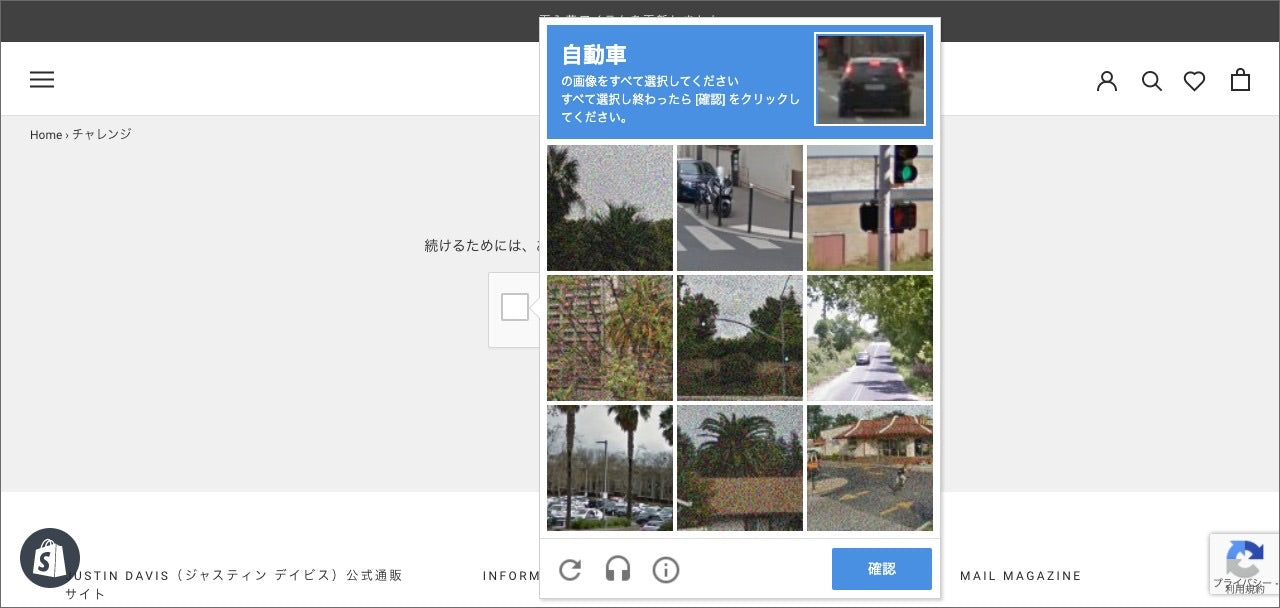
Your member registration is now complete. If you have any questions, please contact us using this inquiry form.
We hope you continue to use the official JUSTIN DAVIS online store.

